



Jam is an open-source and non-custodial software that allows interaction with the decentralized JoinMarket protocol.
Jam is a graphical user interface (Web UI) program that allows the use of JoinMarket in a simple and intuitive way.

JoinMarket is a protocol that allows collaborative p2p transactions. A collaborative transaction is also known as a Coinjoin.
Unlike coinjoin services that have a centralized coordinator, in JoinMarket users coordinate themselves to perform a collaborative transaction. The protocol has a market composed of makers, that is, users who offer their bitcoins in exchange for a fee to facilitate coinjoin transactions, and takers, users who want to perform a collaborative transaction and who pay a fee to do so.
To use Jam, you need to have a Bitcoin full node. The software is currently available on Umbrel, Citadel, RaspBlitz, MyNode and Start9, and you just need to install the app on your node. The graphical interface is identical for all implementations.
Jam is completely non-custodial, meaning that the ownership of the funds always remains in the hands of the user.
How to use Jam
First of all, you need to create a new wallet by clicking on Create new wallet.

You will then be asked to give a name to the wallet, choose a password to encrypt it, and click Create to generate it.

In the next screen, you will be shown the password and the list of 12 words of the seed phrase to save in order to be able to restore the wallet. Save the seed phrase with extreme care.

After completing the seed phrase backup process, you can click on Fund Wallet.
At this point, a card (Cheatsheet) with the main Jam instructions will be displayed.
To make it easier for users to understand how Jam works, the developers wanted to use an analogy: the “jam jars” present on the home screen represent the individual accounts of the wallet created on Jam. Each jar can hold, send and receive bitcoins. Depending on the privacy level of the individual UTXOs, it would be ideal to divide the funds into different jars.


Main functions
The main functions of Jam are four: Receive, Send, Earn and Sweep.
The Receive function allows you to receive bitcoins as on any other software wallet.
The Send function allows you to send transactions to external wallets or to other Jam accounts, known as jars. Through this function it is possible to participate in collaborative transactions by taking the role of taker.
The Earn function allows you to be a maker, that is, to offer bitcoin liquidity to help other users make coinjoin and earn a commission in exchange for the service.
If a user decides to act as a maker, they can set a Fidelity Bond to attract users to choose them as a collaborator for a coinjoin transaction. The concept of the Fidelity Bond was introduced in the JoinMarket protocol as a system to ensure that market actors act honestly. It is a protection mechanism against various types of attacks involving the creation of fraudulent identities.
The Fidelity Bond is a function that allows you to lock a certain amount of bitcoin to show the network your commitment (reputation) to using the protocol. It is important to lock a certain amount of bitcoin if you want other taker users to consider and accept the offer. The locked bitcoins are impossible to move until the bond expires.
The Sweep function allows you to send bitcoins from any Jam account to another external wallet in a privacy-focused manner.
How to do coinjoin as a taker (Receive & Send)
Once the wallet is set up, the first operation to do to start using Jam is to receive funds. Clicking on Receive will generate a new address.


After making the transaction, the funds will be visible in the first jar. Clicking on the Look Inside option will allow you to see the UTXO inside the wallet.

Before being able to make a coinjoin transaction with Jam, you need to wait for at least five confirmations.
After receiving the five confirmations, through the Send function, you can send bitcoins to an external wallet or to another jar in your own wallet.
Before confirming an outgoing transaction, you can choose whether to perform a coinjoin transaction or send the funds directly to the recipient.


Clicking on Send allows you to choose which address or which jar to send bitcoins by making a coinjoin transaction. In this case, we choose to send bitcoins to the Elderberry jar. You can also send funds without performing a collaborative transaction.
To perform a coinjoin, you need to select the number of users you want to collaborate with and the maximum amount of fees you are willing to pay for each collaborator. In the example shown, 10 collaborators were selected, with a maximum fee of 5,000 sats each. After choosing where to send the bitcoins, with how many users to do the coinjoin, and setting the fee cap, the Confirm button will complete the transaction and send it to the network.

Click Send to send the transaction. Confirm the transaction by clicking Confirm.


The fees shown in the summary screen before sending a transaction are the potential maximum fees the user will have to pay. In most cases, the final amount will be less than the displayed amount.
In a collaborative transaction, there are other users who have used the Send function and users who have used the Earn function.
Once the transaction has been made, the funds are visible in the selected destination jar or at the address chosen as the recipient.

Clicking on Look Inside on the Elderberry jar allows you to view the UTXO resulting from the coinjoin transaction.

Clicking on Details allows you to see further details of the UTXO.
How to do coinjoin as a maker (Earn)
The Earn function allows you to offer liquidity to facilitate a collaborative transaction in exchange for a fee.
To start acting as a maker, you need to click on Earn and set your offer.
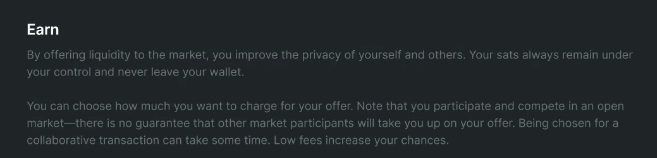
Set the fees, choosing between the two options available:
- Absolute offer: in this case the chosen fee is a fixed amount;
- Relative offer: in this case the chosen fee is a percentage of the transaction.

Clicking on Start Earning publishes the offer and every time it is chosen by taker users, the maker will earn a commission and increase the privacy of the UTXOs made available.
To configure a Fidelity bond, click the “+” symbol on the right side of the screen.

It is possible to choose the year and month of the fidelity bond’s expiration.

The longer the bond’s expiration, the more likely it is that a taker user will be attracted to the offer.

If you want to change the offer parameters, simply click “Stop” and recreate it. Keep in mind that without a Fidelity bond, it may be more difficult for your offer to be selected.
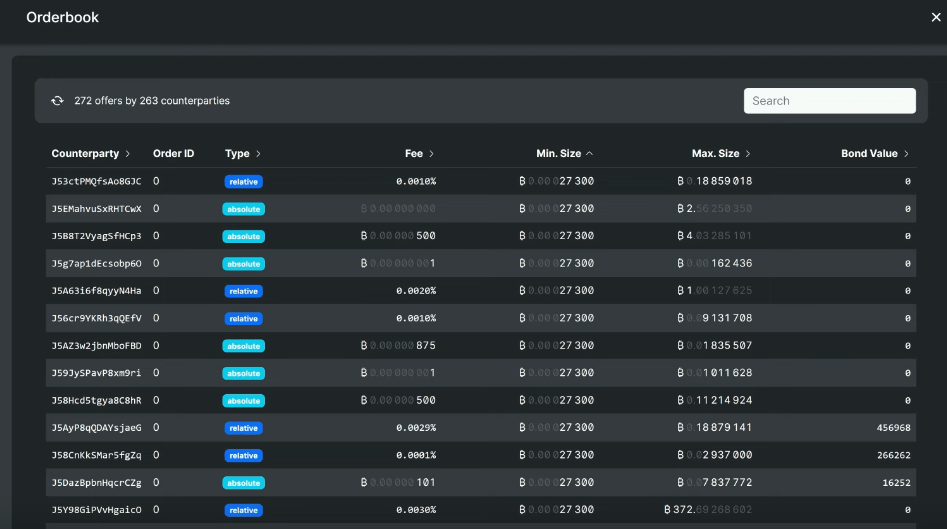
By clicking “Show orderbook,” you can view all the other offers from users who want to act as makers.
Sweep function
The Sweep function collects all UTXOs from all jars and sends them to three different addresses with random Bitcoin amounts and at varying time intervals to enhance transaction privacy and confuse the heuristics used by blockchain analysis companies.
Every transaction performed with the Sweep function is a coinjoin. During the process, various UTXOs may first pass through different jars before reaching the chosen final destination address.
The Sweep function is particularly useful when you have multiple UTXOs spread across different jars.